
| [ < ] | [ > ] | [ << ] | [ Up ] | [ >> ] | [Top] | [Contents] | [Index] | [ ? ] |
1.4.2 Line styles
The line style is defined by the string which may contain specifications for color (‘wkrgbcymhRGBCYMHWlenupqLENUPQ’), dashing style (‘-|;:ji’ or space), width (‘0123456789’) and marks (‘o+xsd.^v’ and ‘#’ modifier). If one of type of information is omitted then default values with the previous color are used.
The color types are the same as described in mglColor class (see section mglColor class): ‘k’ – black, ‘r’ – red, ‘R’ – dark red, ‘g’ – green, ‘G’ – dark green, ‘b’ – blue, ‘B’ – dark blue, ‘c’ – cyan, ‘C’ – dark cyan, ‘m’ – magenta, ‘M’ – dark magenta, ‘y’ – yellow, ‘Y’ – dark yellow (gold), ‘h’ – gray, ‘H’ – dark gray, ‘w’ – white, ‘W’ – bright gray, ‘l’ – green-blue, ‘L’ – dark green-blue, ‘e’ – green-yellow, ‘E’ – dark green-yellow, ‘n’ – sky-blue, ‘N’ – dark sky-blue, ‘u’ – blue-violet, ‘U’ – dark blue-violet, ‘p’ – purple, ‘P’ – dark purple, ‘q’ – orange, ‘Q’ – dark orange (brown).
Dashing styles has the following meaning: space – no line (usable for plotting only marks), ‘-’ – solid line (################), ‘|’ – dashed line (########________), ‘;’ – small dashed line (####____####____), ‘:’ – dotted line (#___#___#___#___), ‘j’ – dash-dotted line (#######____#____), ‘i’ – small dash-dotted line (###__#__###__#__).
Marker types are: ‘o’ – circle, ‘+’ – cross, ‘x’ – skew cross, ‘s’ - square, ‘d’ - rhomb (or diamond), ‘.’ – point, ‘^’ – triangle up, ‘v’ – triangle down. If string contain symbol ‘#’ then the solid versions of markers are used.
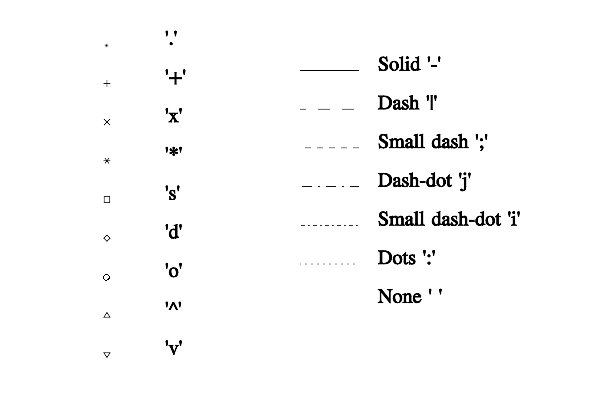
Styles of lines and marks.
One may specify to draw a special symbol (an arrow) at the beginning and at the end of line. It is possible if the specification string contains one of the following symbols: ‘A’ – outer arrow, ‘V’ – inner arrow, ‘I’ – transverse hachures, ‘K’ – arrow with hachures, ‘T’ – triangle, ‘S’ – square, ‘D’ – rhomb, ‘O’ – circle, ‘_’ – nothing (it is default). At this, there is a rule: first symbol specifies the arrow at the end of line, second one specifies the arrow at the beginning of line. For example, ‘r-A’ defines a red solid line with usual arrow at the end, ‘b|AI’ defines a blue dash line with an arrow at the end and with hachures at the start, ‘_O’ defines a line with the current style and with a circle at the start. These styles are applicable during the graphics plotting too (for example, Plot).
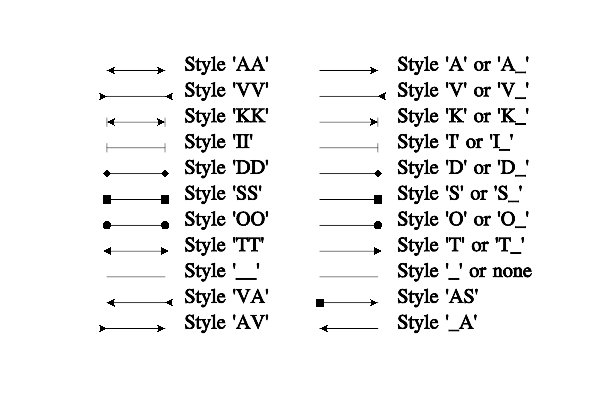
Arrow styles.
| [ < ] | [ > ] | [ << ] | [ Up ] | [ >> ] | [Top] | [Contents] | [Index] | [ ? ] |