
| [ < ] | [ > ] | [ << ] | [ Up ] | [ >> ] | [Top] | [Contents] | [Index] | [ ? ] |
7.27 three
This module fully extends the notion of guides and paths in Asymptote
to three dimensions. It introduces the new types guide3, path3, and surface.
Guides in three dimensions are specified with the same syntax as in two
dimensions except that triples (x,y,z) are used in place of pairs
(x,y) for the nodes and direction specifiers. This
generalization of John Hobby's spline algorithm is shape-invariant under
three-dimensional rotation, scaling, and shifting, and reduces in the
planar case to the two-dimensional algorithm used in Asymptote,
MetaPost, and MetaFont [cf. J. C. Bowman, Proceedings in
Applied Mathematics and Mechanics, 7:1, 2010021-2010022 (2007)].
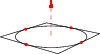
For example, a unit circle in the XY plane may be filled and drawn like this:
import three;

size(100);

path3 g=(1,0,0)..(0,1,0)..(-1,0,0)..(0,-1,0)..cycle;
draw(g);
draw(O--Z,red+dashed,Arrow3);
draw(((-1,-1,0)--(1,-1,0)--(1,1,0)--(-1,1,0)--cycle));
dot(g,red);
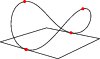
 and then distorted into a saddle:
import three;

size(100,0);
path3 g=(1,0,0)..(0,1,1)..(-1,0,0)..(0,-1,1)..cycle;
draw(g);
draw(((-1,-1,0)--(1,-1,0)--(1,1,0)--(-1,1,0)--cycle));
dot(g,red);
Bezier surfaces, the natural two-dimensional generalization of Bezier
curves, are shaded using the OpenGL lighting scheme, which uses the
Phong-Blinn specular model. Sample Bezier surfaces are contained in the
example files BezierSurface.asy, teapot.asy,
and parametricsurface.asy.
Bezier surfaces are also used to draw arbitrary thick three-dimensional
lines and line caps (which the OpenGL standard does not require
implementations to provide). This can make files slow to render,
especially with the Adobe Reader renderer. The setting
thick=false can be used to disable this feature and force all
lines to be drawn with linewidth(0) (one pixel wide, regardless
of the resolution). By default mesh and contour lines in three-dimensions
are always drawn thin, unless an explicit linewidth is given in the pen
parameter or the setting thin is set to false. The pens
thin() and thick() defined in plain_pens.asy can also be used
to override these defaults for specific draw commands.
There is no fill command for arbitrary three-dimensional cyclic paths
(this would be an ill-posed operation). A three-dimensional planar path
constructed from a two-dimensional cyclic path p can be filled by using
Orest Shardt's bezulate routine to decompose p into an
array of cyclic paths of length 4 or less; these can then be used to
construct and draw a (filled) planar surface:
draw(surface(bezulate(polygon(5))),red);
draw(surface(bezulate(unitcircle)),red);
Alternatively, the routine surface planar(path3 p)
can be used to convert any planar three-dimensional path to a surface.
We also provide constructors for converting two-dimensional paths to
three-dimensional ones, and vice-versa:
path3 path3(path p, triple plane(pair)=XYplane);
path path(path3 p, pair P(triple)=xypart);
There are four choices for viewing 3D Asymptote output:
- Use the default
AsymptoteadaptiveOpenGL-based renderer (with the the command-line option-Vand the default settingsoutformat=""andrender=-1). An initial screen position can be specified with the pair settingposition, where negative values are interpreted as relative to the corresponding maximum screen dimension. The mouse bindings are:- Left: rotate
- shift Left: zoom
- ctrl Left: shift
- Middle: menu
- Wheel: zoom
- Right: zoom
- Right double click: menu
- shift Right: rotate about the X axis
- ctrl Right: rotate about the Y axis
- alt Right: rotate about the Z axis
- h: home
- f: toggle fitscreen
- x: spin about the X axis
- y: spin about the Y axis
- z: spin about the Z axis
- s: stop spinning
- m: rendering mode (solid/mesh/patch)
- e: export
- +: expand
- =: expand
- -: shrink
- _: shrink
- q: exit
- Ctrl-q: exit
- Render the scene to a specified rasterized format
outformatat the resolution ofnpixels perbp, as specified by the settingrender=n. A negative value ofnis interpreted as|4n|for EPS and PDF formats and|2n|for other formats. The default value ofrenderis -1. - Embed the 3D PRC format in a PDF file
(using the setting
outformat="pdf"and the default settingprc=true) and view the resulting PDF file with version8.0or later ofAdobe Reader. This requires version 2008/10/08 or later of themovie15package fromhttp://www.ctan.org/tex-archive/macros/latex/contrib/movie15
A stationary preview image with a resolution of
npixels perbpcan be embedded with the settingrender=n; this allows the file to be viewed with otherPDFviewers. Alternatively, the fileexternalprc.texillustrates how the resulting PRC and rendered image files can be extracted and processed in a separateLaTeXfile. However, seeLaTeXusage for an easier way to embed three-dimensionalAsymptotepictures withinLaTeX. The open-source PRC specification is available from http://www.adobe.com/cfusion/entitlement/index.cfm?e=acrobat_prc_spec - Project the scene to a two-dimensional vector (EPS or
PDF) format with
render=0. Only limited hidden surface removal facilities are currently available with this approach (see 3DPostScript).
Automatic picture sizing in three dimensions is accomplished with double deferred drawing. The maximal desired dimensions of the scene in each of the three dimensions can optionally be specified with the routine
void size3(picture pic=currentpicture, real x, real y=x, real z=y,
          bool keepAspect=pic.keepAspect);
The resulting simplex linear programming problem is then solved to
produce a 3D version of a frame (actually implemented as a 3D picture).
The result is then fit with another application of deferred drawing
to the viewport dimensions corresponding to the usual two-dimensional
picture size parameters.
For convenience, the three module defines O=(0,0,0),
X=(1,0,0), Y=(0,1,0), and Z=(0,0,1), along with a
unitcircle in the XY plane:
path3 unitcircle3=X..Y..-X..-Y..cycle;
A general (approximate) circle can be drawn perpendicular to the direction
normal with the routine
path3 circle(triple c, real r, triple normal=Z);
A circular arc centered at c with radius r from
c+r*dir(theta1,phi1) to c+r*dir(theta2,phi2),
drawing counterclockwise relative to the normal vector
cross(dir(theta1,phi1),dir(theta2,phi2)) if theta2 > theta1
or if theta2 == theta1 and phi2 >= phi1, can be constructed with
path3 arc(triple c, real r, real theta1, real phi1, real theta2, real phi2,
          triple normal=O);
The normal must be explicitly specified if c and the endpoints
are colinear. If r < 0, the complementary arc of radius
|r| is constructed.
For convenience, an arc centered at c from triple v1 to
v2 (assuming |v2-c|=|v1-c|) in the direction CCW
(counter-clockwise) or CW (clockwise) may also be constructed with
path3 arc(triple c, triple v1, triple v2, triple normal=O,
          bool direction=CCW);
When high accuracy is needed, the routines Circle and
Arc defined in graph3 may be used instead.
See GaussianSurface for an example of a three-dimensional circular arc.
The representation O--O+u--O+u+v--O+v--cycle
of the plane passing through point O with normal
cross(u,v) is returned by
path3 plane(triple u, triple v, triple O=O);
A three-dimensional box with opposite vertices at triples v1
and v2 may be drawn with the function
path3[] box(triple v1, triple v2);
For example, a unit box is predefined as
path3[] unitbox=box(O,(1,1,1));
Asymptote also provides optimized definitions for the
three-dimensional paths unitsquare3 and unitcircle3,
along with the surfaces unitdisk, unitplane, unitcube,
unitcylinder, unitcone, unitsolidcone,
unitfrustum(real t1, real t2), unitsphere, and
unithemisphere.
These projections to two dimensions are predefined:
-
oblique -
oblique(real angle) -
The point
(x,y,z)is projected to(x-0.5z,y-0.5z). If an optional real argument is given, the negative z axis is drawn at this angle in degrees. The projectionobliqueZis a synonym foroblique. -
obliqueX -
obliqueX(real angle) -
The point
(x,y,z)is projected to(y-0.5x,z-0.5x). If an optional real argument is given, the negative x axis is drawn at this angle in degrees. -
obliqueY -
obliqueY(real angle) -
The point
(x,y,z)is projected to(x+0.5y,z+0.5y). If an optional real argument is given, the positive y axis is drawn at this angle in degrees. -
orthographic(triple camera, triple up=Z) -
This projects from three to two dimensions using the view as seen at a point infinitely far away in the direction
unit(camera), orienting the camera so that, if possible, the vectoruppoints upwards. Parallel lines are projected to parallel lines. -
orthographic(real x, real y, real z, triple up=Z) This is equivalent to
orthographic((x,y,z),up).-
perspective(triple camera, triple up=Z, triple target=O) -
This projects from three to two dimensions, taking account of perspective, as seen from the location
cameralooking attarget, orienting the camera so that, if possible, the vectoruppoints upwards. Ifrender=0, projection of three-dimensional cubic Bezier splines is implemented by approximating a two-dimensional nonuniform rational B-spline (nurbs) with a two-dimensional Bezier curve containing additional nodes and control points. -
perspective(real x, real y, real z, triple up=Z, triple target=O) This is equivalent to
perspective((x,y,z),up,target).
The default projection, currentprojection, is initially set to
perspective(5,4,2).
A triple or path3 can be projected to a pair or path,
with project(triple, projection P=currentprojection) or
project(path3, projection P=currentprojection).
It is occasionally useful to be able to invert a projection, sending
a pair z onto the plane perpendicular to normal and passing
through point:
triple invert(pair z, triple normal, triple point,
              projection P=currentprojection);
A pair direction dir can be inverted to a triple direction
relative to a point v with the routine
triple invert(pair dir, triple v, projection P=currentprojection).
Three-dimensional objects may be transformed with one of the following built-in transform3 types:
-
shift(triple v) -
translates by the triple
v; -
xscale3(real x) -
scales by
xin the x direction; -
yscale3(real y) -
scales by
yin the y direction; -
zscale3(real z) -
scales by
zin the z direction; -
scale3(real s) -
scales by
sin the x, y, and z directions; -
scale(real x, real y, real z) -
scales by
xin the x direction, byyin the y direction, and byzin the z direction; -
rotate(real angle, triple v) rotates by
anglein degrees about an axisvthrough the origin;-
rotate(real angle, triple u, triple v) rotates by
anglein degrees about the axisu--v;-
reflect(triple u, triple v, triple w) reflects about the plane through
u,v, andw.
Three-dimensional TeX Labels, which are by default drawn as
Bezier surfaces directly on the projection plane, can be transformed
from the XY plane by any of the above transforms or mapped to a
specified two-dimensional plane with the transform3 types XY,
YZ, ZX, YX, ZY, ZX. There are also
modified versions of these transforms that take an optional argument
projection P=currentprojection that rotate and/or flip the
label so that it is more readable from the initial viewpoint.
A transform3 that projects in the direction dir onto the plane
with normal n through point O is returned by
transform3 planeproject(triple n, triple O=O, triple dir=n);
As illustrated in the example planeproject.asy, a transform3
that projects in the direction dir onto the plane defined by a
planar path p is returned by
transform3 planeproject(path3 p, triple dir=normal(p));
Three-dimensional versions of the path functions length,
size, point, dir, accel, radius,
precontrol, postcontrol,
arclength, arctime, reverse, subpath,
intersect, intersections, intersectionpoint,
intersectionpoints, min, max, cyclic, and
straight are also defined.
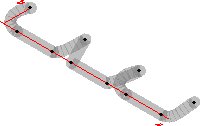
Here is an example showing all five guide3 connectors:
import graph3;

size(200);

currentprojection=orthographic(500,-500,500);

triple[] z=new triple[10];

z[0]=(0,100,0); z[1]=(50,0,0); z[2]=(180,0,0);

for(int n=3; n <= 9; ++n)
  z[n]=z[n-3]+(200,0,0);

path3 p=z[0]..z[1]---z[2]::{Y}z[3]
&z[3]..z[4]--z[5]::{Y}z[6]
&z[6]::z[7]---z[8]..{Y}z[9];

draw(p,grey+linewidth(4mm)+opacity(0.5));

xaxis3(Label(XY()*"$x$",align=-3Y),red,Above);
yaxis3(Label(XY()*"$y$",align=-3X),red,Above);

dot(z);
Three-dimensional versions of arrows can be drawn with one of the specifiers
None, Blank, BeginArrow3, MidArrow3,
EndArrow3 (or equivalently Arrow3), and Arrows3.
The predefined three-dimensional arrowhead styles are
DefaultHead3, HookHead3, TeXHead3.
Further three-dimensional examples are provided in the files
near_earth.asy, conicurv.asy, and (in the animations
subdirectory) cube.asy.
Limited support for projected vector graphics (effectively three-dimensional
nonrendered PostScript) is also available by specifying
settings.render=0. This currently only works for piecewise planar
surfaces, such as those produced by the parametric surface
routines in the graph3 module. Surfaces produced by the
solids package will also be properly rendered if the parameter
nslices is sufficiently large.
In the module bsp, hidden surface removal of planar pictures is
implemented using a binary space partition and picture clipping.
A planar path is first converted to a structure face derived from
picture. A face may be given to a two-dimensional drawing
routine in place of any picture argument. An array of such faces
may then be drawn, removing hidden surfaces:
void add(picture pic=currentpicture, face[] faces,
         projection P=currentprojection);
Labels may be projected to two dimensions, using projection P,
onto the plane passing through point O with normal
cross(u,v) by multiplying it on the left by the transform
transform transform(triple u, triple v, triple O=O,
                    projection P=currentprojection);
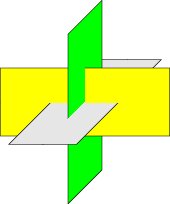
Here is an example that shows how a binary space partition may be used to draw a
PostScript vector image of three orthogonal intersecting planes:
size(6cm,0);
import bsp;

real u=2.5;
real v=1;

currentprojection=oblique;

path3 y=plane((2u,0,0),(0,2v,0),(-u,-v,0));
path3 l=rotate(90,Z)*rotate(90,Y)*y;
path3 g=rotate(90,X)*rotate(90,Y)*y;

face[] faces;
filldraw(faces.push(y),project(y),yellow);
filldraw(faces.push(l),project(l),lightgrey);
filldraw(faces.push(g),project(g),green);

add(faces);
| [ < ] | [ > ] | [ << ] | [ Up ] | [ >> ] | [Top] | [Contents] | [Index] | [ ? ] |