
| [ < ] | [ > ] | [ << ] | [ Up ] | [ >> ] | [Top] | [Contents] | [Index] | [ ? ] |
6. LaTeX usage
Asymptote comes with a convenient LaTeX style file
asymptote.sty that makes LaTeX
Asymptote-aware. Entering Asymptote code
directly into the LaTeX source file, at the point where it is
needed, keeps figures organized and avoids the need to invent new file
names for each figure. Simply add the line
\usepackage{asymptote} at the beginning of your file
and enclose your Asymptote code within a
\begin{asy}...\end{asy} environment. As with the
LaTeX comment environment, the \end{asy} command
must appear on a line by itself, with no leading spaces or trailing
commands/comments.
The current version of asymptote.sty even supports the direct
embedding of 3D PRC files within LaTeX.
The sample LaTeX file below, named latexusage.tex, can
be run as follows:
latex latexusage
asy latexusage
latex latexusage
or
pdflatex latexusage
asy latexusage
pdflatex latexusage
To switch between using latex and
pdflatex you may first need to remove the files
latexusage_.* and latexusage.aux.
If the inline option is given to the
asymptote.sty package, inline LaTeX code is generated instead of
EPS or PDF files. This makes LaTeX symbols visible to the
\begin{asy}...\end{asy} environment. In this mode,
Asymptote correctly aligns LaTeX symbols defined outside of
\begin{asy}...\end{asy}, but treats their size as zero; an
optional second string can be given to Label to provide an
estimate of the unknown label size.
Note that if latex is used with the inline option,
the labels might not show up in DVI viewers that cannot
handle raw PostScript code. One can use dvips/dvipdf to
produce PostScript/PDF output (we recommend using the
modified version of dvipdf in the Asymptote patches
directory, which accepts the dvips -z hyperdvi option).
An excellent tutorial by Dario Teixeira on integrating Asymptote and
LaTeX is available at http://dario.dse.nl/projects/asylatex/.
Here now is latexusage.tex:
\documentclass[12pt]{article}

% Use this form to include eps (latex) or pdf (pdflatex) files:
\usepackage{asymptote}

% Use this form with latex or pdflatex to include inline LaTeX code:
%\usepackage[inline]{asymptote}

% Enable this line to produce pdf hyperlinks with latex:
%\usepackage[hypertex]{hyperref}

% Enable this line to produce pdf hyperlinks with pdflatex:
%\usepackage[pdftex]{hyperref}

\begin{document}

\begin{asydef}
// Global Asymptote definitions can be put here.
usepackage("bm");
texpreamble("\def\v#1{\bm{#1}}");
\end{asydef}

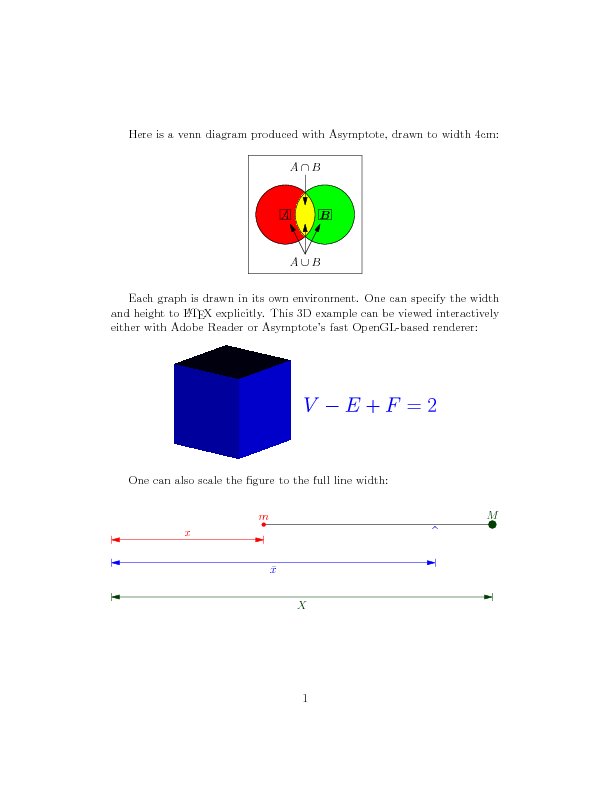
Here is a venn diagram produced with Asymptote, drawn to width 4cm:

\def\A{A}
\def\B{\v{B}}

%\begin{figure}
\begin{center}
\begin{asy}
size(4cm,0);
pen colour1=red;
pen colour2=green;

pair z0=(0,0);
pair z1=(-1,0);
pair z2=(1,0);
real r=1.5;
path c1=circle(z1,r);
path c2=circle(z2,r);
fill(c1,colour1);
fill(c2,colour2);

picture intersection=new picture;
fill(intersection,c1,colour1+colour2);
clip(intersection,c2);

add(intersection);

draw(c1);
draw(c2);

//draw("$\A$",box,z1);              // Requires [inline] package option.
//draw(Label("$\B$","$B$"),box,z2); // Requires [inline] package option.
draw("$A$",box,z1);
draw("$\v{B}$",box,z2);

pair z=(0,-2);
real m=3;
margin BigMargin=Margin(0,m*dot(unit(z1-z),unit(z0-z)));

draw(Label("$A\cap B$",0),conj(z)--z0,Arrow,BigMargin);
draw(Label("$A\cup B$",0),z--z0,Arrow,BigMargin);
draw(z--z1,Arrow,Margin(0,m));
draw(z--z2,Arrow,Margin(0,m));

shipout(bbox(0.25cm));
\end{asy}
%\caption{Venn diagram}\label{venn}
\end{center}
%\end{figure}

Each graph is drawn in its own environment. One can specify the width
and height to \LaTeX\ explicitly. This 3D example can be viewed
interactively either with Adobe Reader or Asymptote's fast OpenGL-based
renderer:
\begin{center}
\begin{asy}[0,4cm]
import three;
if(settings.render < 0) settings.render=8;

draw(unitcube,blue);
label("$V-E+F=2$",(0,1,0.5),3Y,blue+fontsize(20));
\end{asy}
\end{center}

One can also scale the figure to the full line width:
\begin{center}
\begin{asy}[\the\linewidth]
pair z0=(0,0);
pair z1=(2,0);
pair z2=(5,0);
pair zf=z1+0.75*(z2-z1);

draw(z1--z2);
dot(z1,red+0.15cm);
dot(z2,darkgreen+0.3cm);
label("$m$",z1,1.2N,red);
label("$M$",z2,1.5N,darkgreen);
label("$\hat{\ }$",zf,0.2*S,fontsize(24)+blue);

pair s=-0.2*I;
draw("$x$",z0+s--z1+s,N,red,Arrows,Bars,PenMargins);
s=-0.5*I;
draw("$\bar{x}$",z0+s--zf+s,blue,Arrows,Bars,PenMargins);
s=-0.95*I;
draw("$X$",z0+s--z2+s,darkgreen,Arrows,Bars,PenMargins);
\end{asy}
\end{center}
\end{document}
| [ < ] | [ > ] | [ << ] | [ Up ] | [ >> ] | [Top] | [Contents] | [Index] | [ ? ] |