
| [ < ] | [ > ] | [ << ] | [ Up ] | [ >> ] | [Top] | [Contents] | [Index] | [ ? ] |
2.2.4 Text printing example
MathGL prints text by vector font. There are functions for manual specifying of text position (like Puts) and for its automatic selection (like Label, Legend and so on). MathGL prints text always in specified position even if it lies outside the bounding box. The default size of font is specified by variables FontSize (see section Font settings). However, the actual size of output string depends on position of axes (depends on functions SubPlot, InPlot). The switching of the font style (italic, bold, wire and so on) can be done for the whole string (by function parameter) or inside the string. By default MathGL parses TeX-like commands for symbols and indexes (see see section mglFont class). Example of MathGL font drawing is:
    int sample(mglGraph *gr, void *)
    {
        setlocale(LC_CTYPE, "ru_RU.cp1251");
        gr->Puts(mglPoint(0,1),"Text can be in english и на русском");
        gr->Puts(mglPoint(0,0.6),"It can be \\wire{wire} and \\big{big}");
        gr->Puts(mglPoint(0,0.2),"One can change style in string: "
            "\\b{bold}, \\i{italic, \\b{both}}");
        gr->Puts(mglPoint(0,-0.2),"Easy to \\a{overline} or "
            "\\u{underline}");
        gr->Puts(mglPoint(0,-0.6),"Easy to change indexes ^{up} _{down} @{center}");
        gr->Puts(mglPoint(0,-1),"It parse TeX: \\int \\alpha \\cdot "
            "\\sqrt3{sin(\\pi x)^2 + \\gamma_{i_k}} dx");
        return 0;
    }
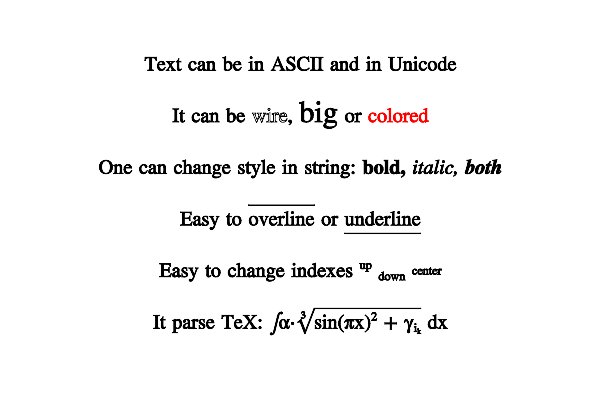
Example of text printing with different font effects
Another example demonstrate the features of TeX formula parsing.
    int sample(mglGraph *gr, void *)
    {
        gr->Puts(mglPoint(0), "\\sqrt{\\frac{\\alpha^{\\gamma^2}+\\overset 1{\\big\\infty}}{\\sqrt3{2+b}}}", 0, -4);
        return 0;
    }
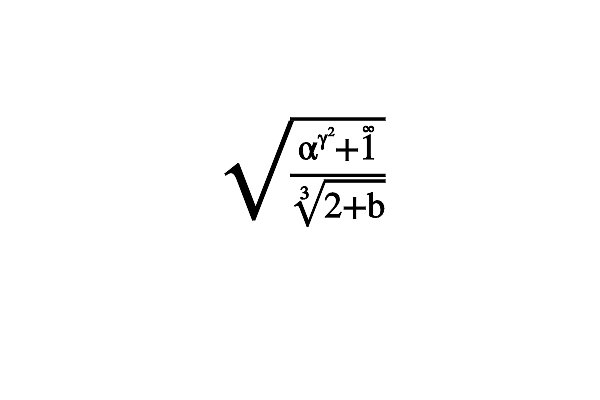
Example of text printing with different font effects